
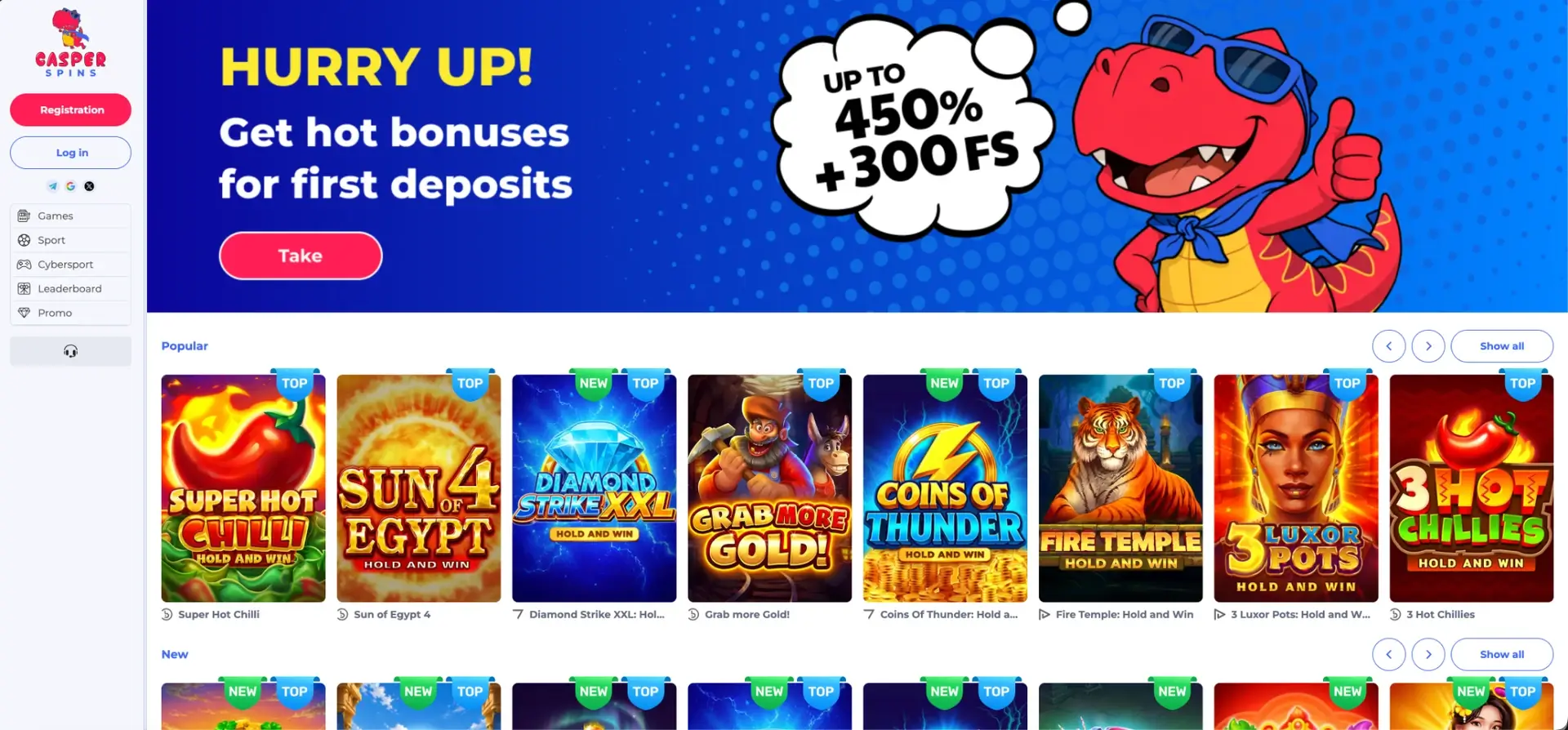
The Casper Spins app experience runs in the mobile browser: the main menu of the site (Games, Sport, Cybersport, Leaderboard, Promo) does not include a download section, and the full casino, live casino, sportsbook, promotions and Cashbox work on iPhone and Android without installing anything. To get an app-style icon, open the site in Safari on iPhone or Chrome on Android and choose Add to Home Screen. The shortcut opens Casper Spins directly, updates automatically, takes no storage, and supports Apple Pay, Google Pay, Monzo, Revolut, Starling Bank and crypto deposits in pounds.
The sections below explain how to set up the home screen icon on each platform, what is available on mobile, how payments and withdrawals work from a phone, and how to solve the most common mobile problems.
| Feature | Casper Spins on mobile |
|---|---|
| Download required | No, runs in the browser |
| iPhone and iPad | Safari, Chrome or Firefox |
| Android | Chrome or any modern browser |
| Home screen icon | Available on iOS and Android |
| Games | Same catalogue as desktop, 140+ studios |
| Live casino | Full roulette and live table selection |
| Sport and cybersport | Live and pre-match betting with betslip |
| Promotions | Jackpot Time, Book of Jackpots, 24-Hour Prize Draw, Weekly Battle |
| Payments | Apple Pay, Google Pay, cards, Monzo, Revolut, Starling, bank transfer, crypto |
| Login | Email, phone number, Telegram, Google, X |
| Updates | Automatic, no manual updates |
| Support | Live chat 24/7, phone +44 1241 340774 |
Is there a Casper Spins app for Android or iOS?
There is no separate download listed in the site menu, and no App Store or Google Play version is promoted on the site. Real-money casino apps licensed outside Great Britain are generally not admitted to UK app stores, which is why brands like Casper Spins rely on the mobile site.
For everyday play, the difference is small. The mobile site has the same games, the same Cashbox and the same promotions as desktop, and a home screen icon removes the need to type the address each time. If a downloadable version becomes available, support can confirm the official link, and a file should never be installed from a third-party site.
How to open Casper Spins on a phone
Getting started takes a few seconds.
- Open Safari, Chrome or another browser on the phone.
- Go to the official Casper Spins address, ideally from the link in the registration email.
- Tap Log in or Registration.
- Sign in with email, phone number, Telegram, Google or X.
- The lobby, Promo section and Cashbox are ready to use.
Adding Casper Spins to the home screen
A home screen shortcut makes the site open like an app, without the address bar in the way on many phones.
iPhone and iPad (Safari)
The option is in Safari's Share menu.
- Open the Casper Spins site in Safari.
- Tap the Share icon (the square with an arrow pointing up).
- Scroll down and choose Add to Home Screen.
- Keep the name "Casper Spins" or type another, then tap Add.
- The icon appears on the home screen.
Android (Chrome)
On Android the option is in the browser menu.
- Open the Casper Spins site in Chrome.
- Tap the three-dot menu in the top-right corner.
- Choose Add to Home screen or Install app if it is offered.
- Confirm the name and tap Add.
What is available on mobile
The mobile layout folds the left menu into a compact bar, while all sections remain available.
- Games: All, New, Popular, Jackpots, Slots, Table games, Live Casino, Other games and Crash games, with search and filters.
- Slots: Hold and Win titles such as Super Hot Chilli, Sun of Egypt 4, Coins of Thunder, Fire Temple and 3 Luxor Pots.
- Live Casino: European roulette, Gravity Roulette, Roulette De Luxe, auto roulette wheels and game shows such as Fishing Time.
- Sport: football, tennis, basketball, cricket, ice hockey and more, with live betting and booking codes.
- Cybersport: esports betting.
- Promo and Leaderboard: lotteries, tournaments and rankings.
- Cashbox and Profile: payments and document upload.
Many slots from PG Soft and Booongo are designed for portrait mode and fill the phone screen without rotating it. Live tables and match centres usually work better in landscape.
Mobile performance tips
The site is light enough for standard mobile connections, but a few settings help on slower networks.
- Keep the browser updated to the latest version.
- Close other tabs: the terms also allow winnings to be cancelled when games run in more than one tab.
- Use Wi-Fi for long live dealer sessions.
- Lower the stream quality in the live table settings if video stutters.
- Clear the browser cache if the lobby loads slowly.
Mobile payments and withdrawals in pounds
The phone is the most convenient place to use the Cashbox, since wallets and app-based banks confirm payments without typing card numbers.
| Method | How it works on mobile |
|---|---|
| Apple Pay | Face ID or Touch ID on iPhone |
| Google Pay | One-tap confirmation on Android |
| Monzo | Approval in the Monzo app |
| Revolut | Approval in the Revolut app |
| Starling Bank | Approval in the Starling app |
| Visa / Mastercard | Card details and bank 3D Secure check |
| Bank Transfer | Payment from the banking app |
| Crypto | Wallet address or QR code for 14+ coins |
Withdrawal rules are the same on every device: each deposit wagered at least three times, phone and email confirmed, documents uploaded. Processing typically takes 24 to 36 hours, with limits of about £1,720 per day and £4,300 per month. Documents can be photographed and uploaded straight from the phone in the Profile section.
Security on mobile
The mobile site uses the same SSL encryption as desktop. A screen lock on the phone, a unique account password and two-step verification on any social account used for login cover the main mobile risks. Because there is no official download, any file offered as a "Casper Spins APK" on other sites should be treated as unsafe.
Tips for UK players on mobile
A few habits make mobile play smoother.
- Add the site to the home screen to avoid copies of the site in search results.
- Use phone-number login for quick access on mobile.
- Activate a bonus before depositing, not after.
- Check the Promo section daily for the 24-Hour Prize Draw.
- Upload verification documents with the phone camera on the day of registration.
- Set a time and spending limit, since a phone is always within reach.
Casper Spins app FAQ
Answers to the most common mobile questions.
Can I download the Casper Spins app?
No download is listed in the site menu, and no App Store or Google Play version is promoted on the site. The mobile site with a home screen icon gives the same features.
Does Casper Spins work on iPhone?
Yes, in Safari or any other browser. Add to Home Screen creates an app-style icon.
Can I bet on sport from my phone?
Yes. The Sport and Cybersport sections work on mobile with live betting, the betslip and booking codes.
Can I use Apple Pay at Casper Spins?
Yes. Apple Pay and Google Pay are both available in the mobile Cashbox.
Is it safe to install a Casper Spins APK?
Files from third-party sites should not be installed. Support can confirm whether an official download exists.
Are the promotions the same on mobile?
Yes. Jackpot Time, Book of Jackpots, the 24-Hour Prize Draw, Weekly Battle and the leaderboard all work on mobile.