
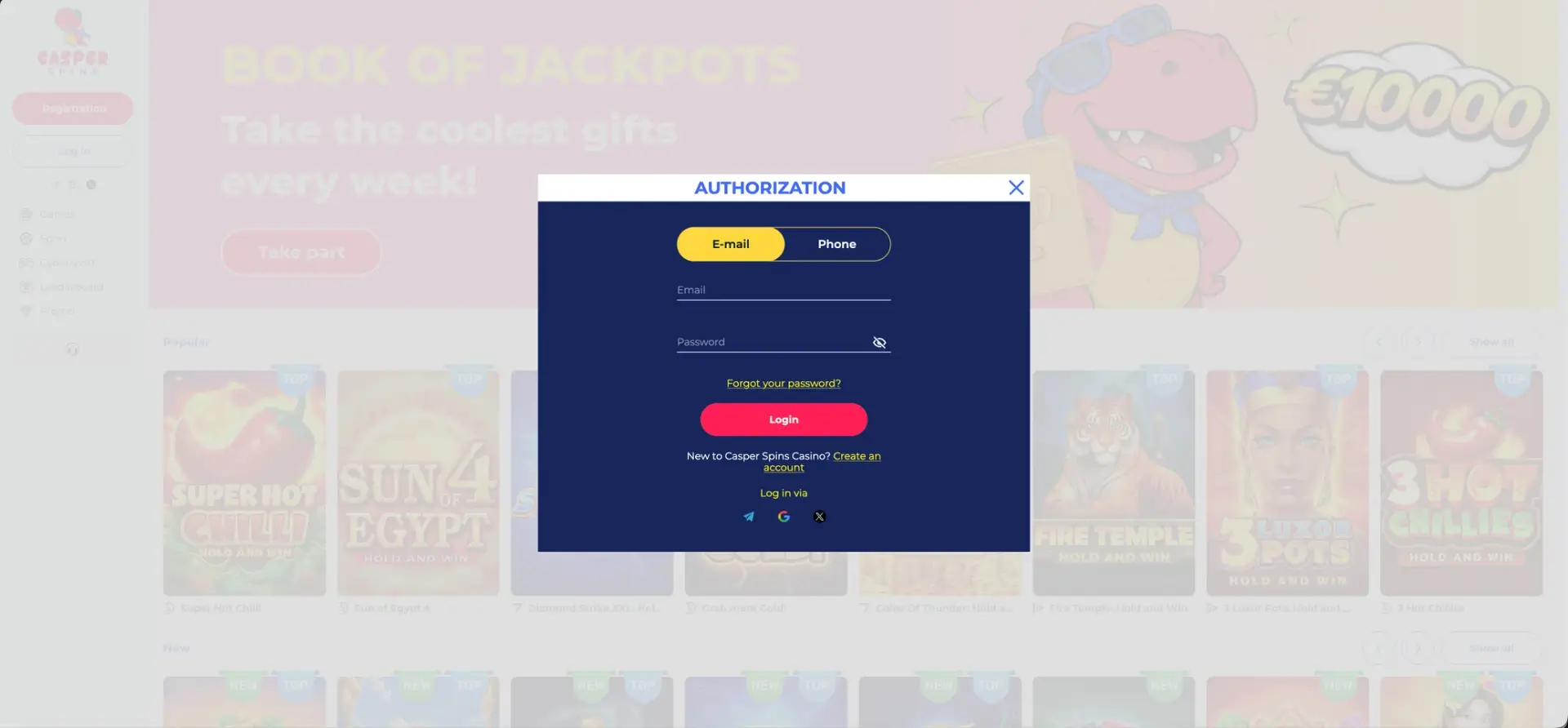
Casper Spins login works in three ways: with an email and password, with a phone number and password (switch to the Phone tab in the Authorization window), or with one click through Telegram, Google or X. Press Log in at the top of the left menu, choose the method and press the red Login button. A forgotten password is restored with the Forgot your password? link, and if access still fails, support is available 24/7 by live chat or by phone on +44 1241 340774. The same account opens the casino, live casino, sport and cybersport sections on desktop and mobile.
Signing in gives access to the Cashbox, active bonuses, tournament and lottery progress, the leaderboard position and the Profile, where documents for withdrawal are uploaded. Completing the profile early is the best way to make the first cash-out quick.
| Login essentials | Details |
|---|---|
| Where to log in | Log in button at the top of the left menu |
| Login methods | Email, phone number, Telegram, Google, X |
| Quick login icons | Telegram, Google and X under the Log in button |
| Password reset | Forgot your password? link in the Authorization window |
| Devices | Desktop and mobile browsers |
| Connection security | SSL encryption |
| Required for withdrawals | Confirmed phone and email, uploaded documents |
| Currency | GBP |
| Support | Live chat 24/7, phone +44 1241 340774 |
How to log in to Casper Spins
The Authorization window opens over the current page. At the top there is a switch between E-mail and Phone, so the account can be accessed with whichever contact detail is easier to remember.
Login with email
This is the default tab and the standard route for accounts registered through the email form.
- Open the Casper Spins site.
- Click Log in at the top of the left menu.
- Keep the E-mail tab selected and enter the registration email.
- Type the password. The eye icon reveals the characters to check for typos.
- Press Login.
Login with a phone number
The phone option is useful once a number has been added and confirmed in the profile, which is also one of the conditions for withdrawals.
- Click Log in.
- Switch to the Phone tab.
- Enter the phone number linked to the account, including the UK code.
- Enter the password and press Login.
Login with Telegram, Google or X
The three social icons appear in two places: right under the Log in button in the left menu, and at the bottom of the Authorization window under "Log in via". An account created through a social network should always be accessed with the same button.
- Click the Telegram, Google or X icon.
- Confirm access in the window of that service.
- The page returns to Casper Spins with the account open.
Creating an account from the login window
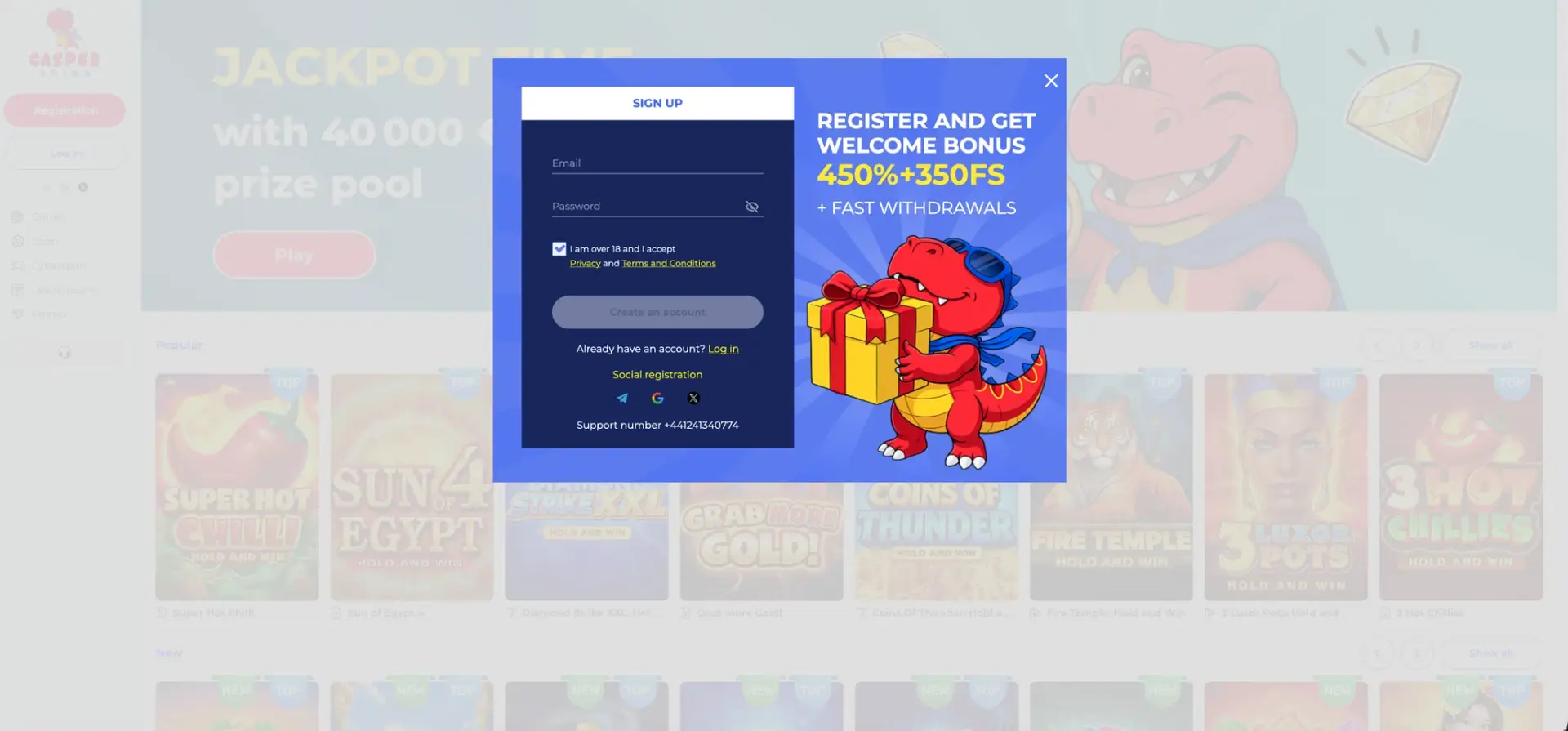
The Authorization window has a line "New to Casper Spins Casino? Create an account" that switches to the Sign Up form. The registration window shows the welcome offer, 450% + 350 FS with fast withdrawals.
Quick registration flow
Registration takes less than a minute and needs only an email and a password.
- Enter an email address and create a password.
- Tick the box confirming age 18+ and acceptance of the Privacy policy and Terms and Conditions.
- Press Create an account, or use Telegram, Google or X under "Social registration".
- Before the first deposit, activate the welcome bonus if it is wanted.
Secure login practices
The connection is protected by SSL encryption. The rest of account security depends on a few habits.
- Use a unique password not shared with other sites, ideally from a password manager.
- Turn on two-step verification on the Google, Telegram or X account used for social login.
- Check for the padlock in the address bar before entering details.
- Log out on shared devices rather than just closing the tab.
- Never share the password, including with anyone claiming to be support staff.
- Use one browser tab for playing: the Terms and Conditions allow winnings to be cancelled when games are played in more than one active tab.
Password recovery
The Forgot your password? link sits under the password field in the Authorization window. It works for accounts registered by email or phone. Accounts created through Telegram, Google or X are managed by those services.
Reset steps
A recovery link or code is sent to the contact detail on the account.
- Click Log in, then Forgot your password?.
- Enter the email or phone number linked to the account.
- Follow the link in the email or enter the code received.
- Set a new password and confirm it.
- Sign in with the new password.
If the message does not arrive, check the spam and promotions folders. Support can then help by chat or on +44 1241 340774.
Mobile login
On a phone, the Authorization window has the same tabs and buttons, arranged for a narrow screen. Phone login is particularly convenient on mobile, since the number is easier to type than a long email address.
Tips for mobile
A few settings make mobile login faster.
- Allow the browser to save the password for automatic filling.
- Use Google login on Android or Telegram if the app is installed.
- Add the site to the home screen for one-tap access.
- Keep a single tab open while playing.
Troubleshooting Casper Spins login errors
Most login problems have a simple cause. The checks below solve the majority without contacting support.
Incorrect email, phone or password
Check that the right tab is selected: an email typed in the Phone tab will not be accepted. Passwords are case-sensitive, so check Caps Lock and use the eye icon. If the account was opened through a social network, use that button instead.
Browser or cache issues
If the window does not respond or reloads without signing in, the browser is usually the cause.
- Clear cookies and cache for the site and reload.
- Disable ad blockers for the site.
- Try another browser or a private window.
- Update the browser.
Social login does not finish
If the Telegram, Google or X window closes without signing in, pop-ups may be blocked. Allow pop-ups for the site and check that the browser is signed into the right social account.
The site does not open
Some UK internet providers restrict access to casinos licensed outside Great Britain. The current address can be confirmed through the registration email or by phoning support.
Account restricted
Access can be restricted after repeated wrong passwords, a duplicate account or a self-exclusion request. Support can explain the reason and the next step.
What is available after login
Once signed in, the account menu opens access to every personal section. The main areas are:
- Cashbox - deposits and withdrawals in pounds or crypto.
- Bonuses - activating the welcome offer before depositing.
- Promo - Jackpot Time, Book of Jackpots, the 24-Hour Prize Draw and Weekly Battle.
- Leaderboard - personal place and points.
- Profile - email, phone and uploaded documents.
- My Bets - sport and esports bet history.
Account verification after login
Verification is needed to withdraw. The Cash transactions FAQ requires a confirmed phone number and email, plus all documents uploaded and confirmed. The FAQ also notes that withdrawals are processed faster when documents are uploaded in advance in the Profile section.
The Verification tab of the FAQ lists what is required. Casinos usually ask for a photo ID, a proof of address no older than three months and proof of the payment method. The terms set a short deadline for sending documents once they are requested, so it helps to prepare clear colour photos in advance.
Casper Spins login FAQ
Short answers to the most common sign-in questions.
How do I log in to Casper Spins?
Click Log in in the left menu and enter your email or phone number with your password, or use the Telegram, Google or X icons.
Can I log in to Casper Spins with my phone number?
Yes. Switch to the Phone tab in the Authorization window and enter the number linked to the account.
I forgot my Casper Spins password. What now?
Press Forgot your password?, enter your email or phone, and follow the link or code to set a new password.
Why does my Google login not work?
Pop-ups may be blocked, or the browser may be signed into another Google account. Allow pop-ups and pick the account used at registration.
Is there a phone number for Casper Spins support?
Yes, +44 1241 340774. Live chat is also available 24/7 through the headset icon in the left menu.
Do I need to verify my account to play?
Not to play, but to withdraw: the phone and email must be confirmed and documents uploaded.